System variables and status information
Available for AXC F x152, AXC F 1252, RFC 4072S, RFC 4072R, SPLC 1000
This section describes the system variables that are available for PLCnext Control devices. These controllers have a register set that is used for diagnostics and easy control of the controller and the Axioline F local bus.
The diagnostic data is stored in the diagnostic status register and the diagnostic parameter register. These registers are available to the application program as system variables (system flags, global variables).
Showing the system variables of a device
In the PLCnext Engineer software suite, you can find all system variables that are supported by a device. To show all system variables, proceed as follows:
- Double-click on the IEC61131-3 node in the PLANT area (in pre-2022 software versions this node was named PLC.)
↪ The Variable (PLC) editor group opens (in pre-2022 software versions this editor group was named / PLC.) - If not selected by default, select the Data List tab.
- Unfold the System Variables section by double-clicking somewhere in the section.
↪ The system variables are displayed. - To show the data type and several other attributes of each system variable, click the triangle in the table header.
↪ Further columns are expanded.

Showing data structures
Some system variables of the device are organized as data structures. The data structure for this type of system variable contains further system variables, or even further data structures (up to 6 nested levels).
In case of a data structure, the Type column in the data list shows the name of the structure variable instead of its data type.
- Select a row in the Data List tab by clicking on the first (empty) column; e.g.:
RTC. - Click on the
 button to open the Init Value Configuration section below the Data List.
↪ The Init Value Configuration shows which other system variables are contained.
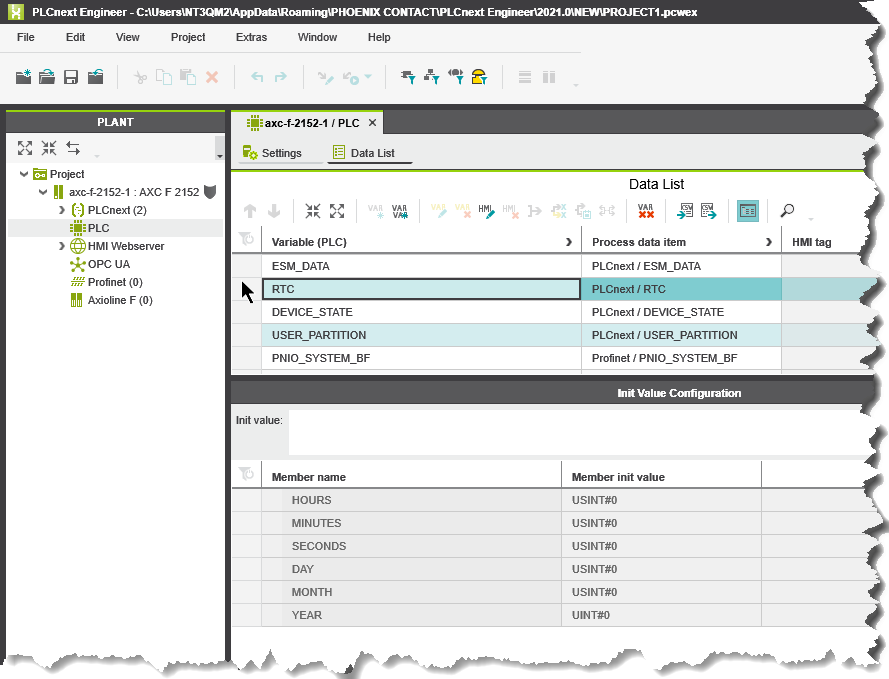
Overview to the available system variables
These sets of system variables are detailed in further topics:
- System time
- IP sockets
- Device status
- User partition
- Task handling
- HMI status and control
- Axioline F diagnostic status and parameter registers
- PROFINET controller and device
- INTERBUS master diagnostic status and parameters
- EtherNet/IP target variables
- System variables of the safety-related firmware
- Redundancy-specific system variables