Notification Logger
The Notification Logger enables saving of notifications in a database so the they can be used for analyzing firmware and applications. Saved notifications can be queried via RSC interfaces.
The logger archives offer functions for acquiring and filtering of incoming notifications as well as for requesting and deleting. Using different archives makes it possible to save notifications for different issues and purposes, e.g.:
- Firmware diagnostics
Short-term saving of firmware events for diagnostics by the service. - Network diagnostics
Saving of diagnostic messages from network components over a short period for diagnosing disconnections or sporadic delays. - Application diagnostics
Saving notifications of the application program, e.g., malfunctions of machines, refilling consumables, error messages by integrated aggregates.
The Notification Logger registers with the Notification Manager for all configured notifications and thus receives all applicable messages that are sent. The saved notifications can be queried, displayed and evaluated using external tools, such as RSC services.
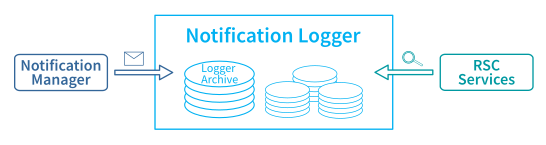
For registering, saving and querying notifications, the Notification Logger uses archives. It provides a uniform interface to these archives and enables the configuration of the archives via configuration files.
Several archives are out-of-the-box ready for use and enable notifications to be saved for different issues and purposes. A logger archive subscribes to all notifications to be received. Additionally, filters can be used in an archive for the subscribed notifications that depend on their metadata. Filtering allows you to select which notifications are actually saved.
The notifications are permanently stored in an SQLite database. This way, the file is not system-oriented and, after copying it to another system, can be opened and processed with the appropriate tools. The predefined databases are available on the file system of your controller at /opt/plcnext/logs/default.sqlite*.sqlite.
Displaying notifications
Notifications that are present on a controller are displayed in PLCnext Engineer and in the Web-based Management on the controller.
Notifications in PLCnext Engineer
- In the PLANT area, click on the controller (e.g., AXC F 2152).
- Select the Cockpit editor.
- Select the Notifications tab.
For detailed information on displaying notifications in PLCnext Engineer, refer to its online help.
Notifications in the Web-based Management
- Log in to the Web-based Management on your device.
- Open the Diagnostics section in the navigation on the left.
- Select the Notifications entry.
For detailed information on displaying notifications in the Web‑based Management, see
- for WBM 2: Diagnostics - Notifications
- for legacy WBM: Diagnostics - Notification Logger.
Notification classes in C++ programs
The PLCnext Technology SDK contains helpful classes for the Notification Logger. If you want to use a notification class, integrate it into your program via an #include command, (e.g., #include Arp/Services/NotificationLogger/Services/INotificationLoggerService.hpp).
INotificationLoggerService2.Further information on the classes and their applications is available directly in the API documentation.
Configuring the Notification Logger
If you created yor own notifications you can configure the Notification Logger to log these notifications, too. The configuration is done by editing a configuration file in XML format using any text or code editor. Additionally, access permissions need to be configured if these notifications are to be logged into a new notification archive.
The Notification Logger configuration files are preferably located in these directories:
- /opt/plcnext/config/Services/NotificationLogger/*.config
(recommended on PLCnext Control devices from firmware 2025.0 and newer) - /opt/plcnext/projects/Default/Services/NotificationLogger/*.config
(default on PLCnext Controlthe first generation of PLCnext Control devices regardless of the firmware release)
The configuration file is imported from there during the start of the firmware, therefore changes to the configuration are automatically applied after a restart of the device.
Configuring your own notifications and archives
If you create your own notifications you can configure the Notification Logger to log those notifications.
A configuration file for the Notification Logger archive is structured as shown in the following example:
<?xml version="1.0" encoding="UTF-8"?>
   <NotificationLoggerConfigurationDocument
       xmlns="http://www.phoenixcontact.com/schema/notificationloggerconfiguration"
       xmlns:xsi="http://www.w3.org/2001/XMLSchema-instance"
       xsi:schemaLocation="http://www.phoenixcontact.com/schema/notificationloggerconfiguration"
       schemaVersion="1.0">
       <Includes>
           <Include path="$ARP_PATH_PROJECTS_DIR$/Default/" />
       </Includes>
       <Archives>
           <Archive name="Default"
               <Notifications>
                   <Notification name="Arp" />
               </Notifications>
               <ExclusionFilter>
                   <Severity Operator="LE" Threshold="Info" />
               </ExclusionFilter>
               <Storage path="$ARP_PATH_HOME_DIR$/logs">
                   <SizeLimitation>
                       <FileSizeLimitation MaxFileSize="64MB" />
                   </SizeLimitation>
                   <SizeReduction>
                       <DeleteOldestEntries NumberOfEntriesToDelete="16" />
                   </SizeReduction>
               </Storage>
            </Archive>
         </Archives>
      </NotificationLoggerConfigurationDocument>
Integrating configuration files
Integrate the configuration files at the <Includes> tag. Use the <Include path="..." /> attribute to reference further files to be integrated. The element can occur any number of times.
Defining an archive
Define an archive between the <Archives> and </Archives> tags using the following attributes:
| Attribute | Description | ||
Archive name |
Name of the archive. The name is used as a basis for the file names. | ||
Notification name |
Name of the notification to be saved to the archive. This element can occur any number of times. | ||
ExclusionFilter |
Specification of the input filter for notifications. This can refer to any part of the namespace. All subordinate notifications are recorded. All notifications matching the filter are discarded and not saved. | ||
And |
AND link of several filter elements. Contains any number of other filter elements. |
||
Or |
OR link of several filter elements. Contains any number of other filter elements. |
||
Not |
Negation of a filter element. Contains exactly one other filter element. | ||
NotificationName |
Regex attribute: Regular expression for the notification name. |
||
SenderName |
Regex attribute: Regular expression for the sender name of the notification. |
||
Severity |
operator attribute: comparison functions are GT, GE, LT, LE, EQthreshold attribute: comparison values are Default, Info, Warning, Error, Critical, Fatal
|
||
Storage |
Specification of the persistent storage of the archive. | ||
path |
Path for saving the archive files. | ||
SizeLimitation |
Limitation of file size. | ||
→ FileSizeLimitation |
MaxFileSize attribute: Maximum storage space in bytes; positive integer required, permitted suffixes are kB (*1024), MB (*1048576). |
||
SizeReduction |
Action for reducing the file size. The action is executed as soon as SizeLimitation is violated. |
||
→ DeleteOldestEntries |
NumberOfEntriesToDelete attribute: Number of elements to be deleted, positive integer. |
||
Configuring access permissions to notification archives
If your own notifications shall be logged into a new notifications archive, their access permissions need to be configured.
From firmware release 2025.0 and newer
You need to configure the access permissions for your notification archives yourself.
The firmware already installs a permissions template file /opt/plcnext/config/System/Um/Permissions/Arp.Services.NotificationLogger.Archive.um.config which can then be adapted to your needs.
The template file contains an XML element <PermissionDatabase> that is commented out. To active that element, just remove the commenting characters around that XML element and replace the archive name "DemoArchive" by your archive name.
Furthermore, if you want additional user roles to access your archive, copy and paste the whole XML element <PermissionSet>, and then replace the Admin user role by the intended user role in that XML element copy.
Up to firmware release 2024.6
On the first generation of PLCnext Control devices, access permissions for all notification archives are predefined to meet each user role.
Note: If those devices are operated with an active Security Profile, see the above section regarding devices equipped with firmware 2025.0 and newer.