Global Data Space
The GlobalDataSpace namespace
All programs and variables from the IEC 61131 context are displayed in the http://phoenixcontact.com/OpcUA/PLCnext/GlobalDataSpace/ namespace. Via the namespace, the corresponding NamespaceIndex can be determined from the NamespaceArray. The NamespaceIndex is a numeric value for identification of the namespace. It is saved in the NamespaceArray. Via the NamespaceIndex and the NodeIdentifier, a corresponding process variable, structure or function block can be retrieved.
The NodeIdentifier is always structured like this: [component name]/[program name].[variable name]
Example: Arp.Plc.Eclr/PG_AllTypes1.DIntVar
In the PLCnext Engineer it looks like this:

In the OPC UA client software UaExpert it looks like this:
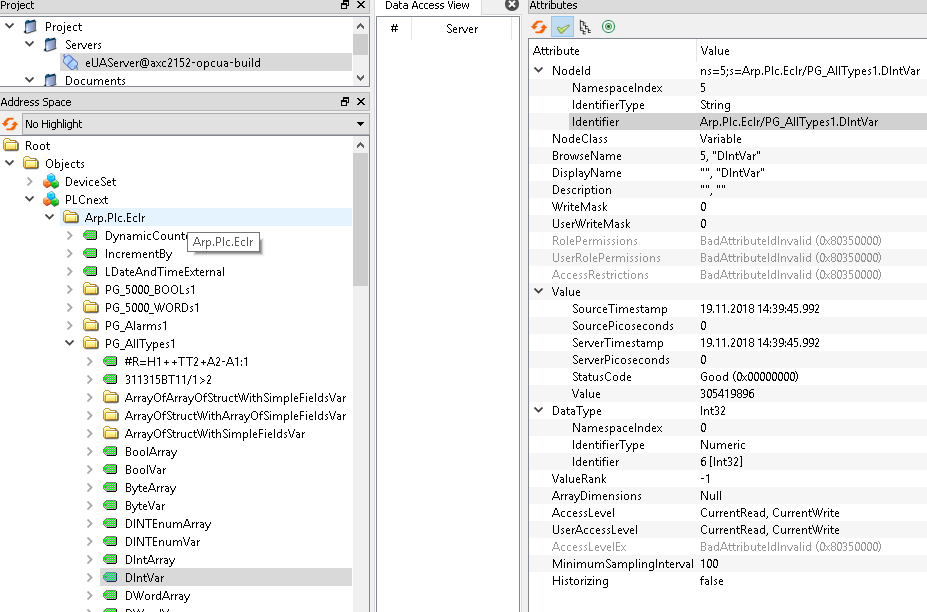
The component name for C++ components is defined in the respective C++ project. It therefore differs from the component name from the IEC 61131 context (Arp.Plc.Eclr).
Structured data types for GDS variables
Available from 2026.6
Starting with firmware 2026.6, the OPC UA server offers the feature Structured Data Types enabling PLCnext Global Data Space (GDS) structures to be exposed as structured OPC UA variables. This allows OPC UA clients to read, write, and subscribe to a complete structure value in a single operation.
This feature can be enabled or disabled using the OPC UA settings editor of PLCnext Engineer (version 2026.6 or newer).
When Structured Data Types is disabled (also for firmware versions up to and including 2026.0 LTS), a GDS structure is represented in the OPC UA address space as a folder. In this case, clients can only access the individual structure elements below that folder, but they cannot access the structure as a single value.
When Structured Data Types is enabled, the structure node is represented as a variable of type BaseDataVariableType. The variable uses the OPC UA structure data type that matches the GDS structure. The individual structure fields remain available below the structure variable, so existing field-level access is still possible when the feature is enabled. The data type's structure is defined as BaseDataVariableType → Structure → Name of the data type in the name space https://phoenixcontact.com/OpcUa/PLCnext/GlobalDataSpaceTypes/. The OPC UA server uses the HasStructuredComponent reference type to connect the structure variable to its field variables.
Supported structures
The Structured Data Types feature supports GDS structures, including:
- Structures with scalar fields
- Structures with array fields
- Structures with matrix fields
- Structures containing nested structures
- Structures that combine nested structures with arrays or matrices
- Arrays of structures
These structures can be read, written, and subscribed to as complete structured values.
Disabled Structured Data Types
The following section describes the OPC UA server behavior when the Structured Data Types option is disabled.
OPC UA clients that expect the previous folder representation may fail or need to be adapted. The following information may be useful for troubleshooting. Especially when your OPC UA client (application) does not work properly after enabling Structured Data Types, it may help to first disable this feature. If then your OPC UA client works properly, review the following differences and adapt your OPC UA client accordingly.
- A variable with a structure data type is represented as
FolderType. The elements of the structure are presented as child nodes beneath that folder using theHasComponentreference type. - The namespace https://phoenixcontact.com/OpcUa/PLCnext/GlobalDataSpaceTypes/ is not present, since no information about the data type is given in the information model.
- The
BrowseNameof structure elements uses the namespace https://phoenixcontact.com/OpcUa/PLCnext/GlobalDataSpace/. This is the same namespace in which the variable's name is located. - Elements of an array variable use only the index in square brackets as
BrowseName. When Structured Data Types is enabled, theBrowseNameconsists of the variable name appended with the index in square brackets.